Calculations
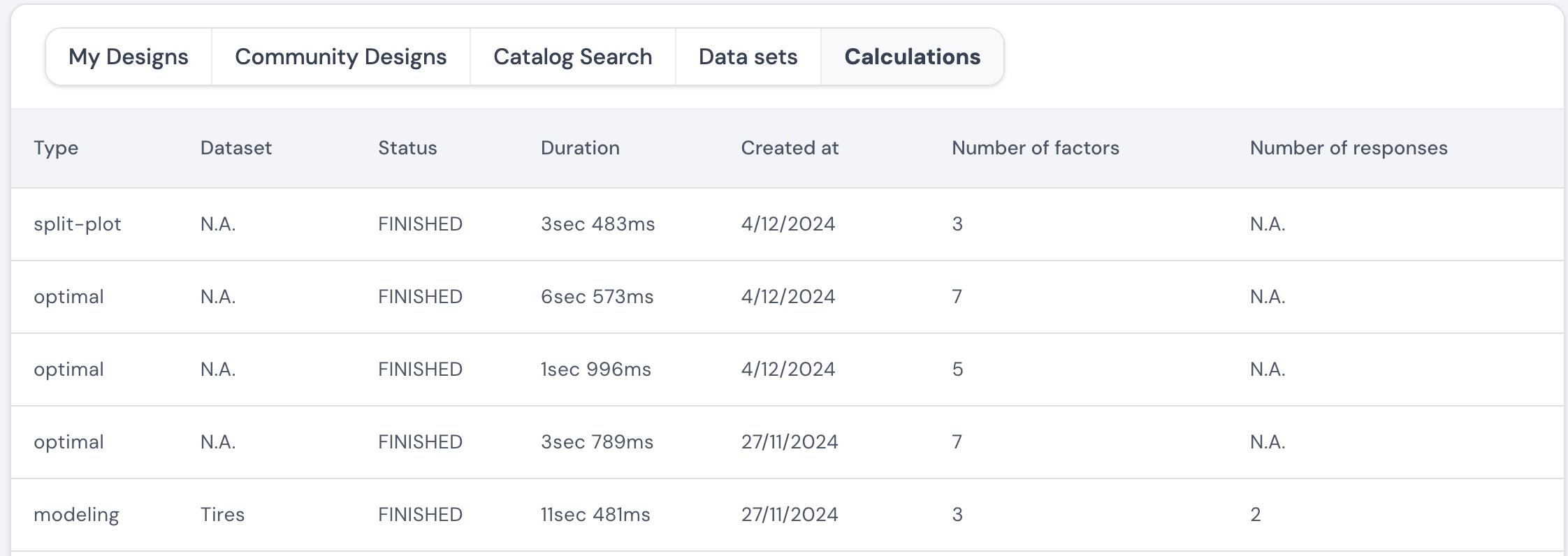
In this tab, a table is provided, which displays one entry for each calculation that is requested in the software. Here is an example of such a table.
In the software, primarily, there are two tasks that require calculations. These are:
-
Generating optimal designs
The software allows the user to generate optimal designs. When the user has started such a calculation, a record of this request will be presented in the table. If the user has requested such an optimal design, then the corresponding entry in the table will have the type ‘optimal’ mentioned in column one. If the user has requested an optimal design with at least one factor whose reset difficulty is set to hard, then the corresponding entry in the table will have the type ‘split-plot’ mentioned in column one. The table also provides the number of factors specified for the design generation in column 6. -
Perform modeling on a dataset
The software allows the user to perform modeling calculations on the datasets that are uploaded. When the user has started such a calculation, a record of this request will be presented in the table with the type ‘modeling’ mentioned in column one. The name of the corresponding dataset is also mentioned in the table in column two. In the last two columns, the number of factors and responses that are specified in the provided dataset is given.
The table also provides information on when the calculations were requested and the duration it took to complete the calculations.
Note: Once a calculation has been requested, there may be a small delay in displaying its corresponding entry in this table.
Page last modified on 26 February 2025