Design description
In the first tab Experimental factors, the characteristics of the factors involved in the experiment are described. There are two types for factors: quantitative and categorical.
To add one quantitative factor, click on the button
Similarly, to add one categorical factor, click on the button
Click on the respective buttons repeatedly until the desired number and type of factors are added.
Setting number of levels for categorical factors
For categorical factors that are added, specify the number of levels associated with each categorical factor. By default, the number of levels for each categorical factor is set to 2. The number of levels for each categorical factor can be changed by clicking on the respective cells in the column levels and entering the actual number of levels for the respective factor.
Setting reset difficulty
In some experiments, it may happen that changing the settings for certain factors is more difficult (or expensive) than for some other factors. In such situations, we make a distinction between hard-to-change factors and easy-to-change factors. In the software, by specificying the reset difficulty for each factor that is added (quantitative or categorical), the software produces designs that take this into account. By setting the reset difficulties, the designs produced by the software will guarantee that the recommended number of changes in settings for the hard-to-change factors is less than that for the easy-to-change factors.
Clicking on the cells in the column reset difficulty, allows you to change these settings and offers three options as given below.
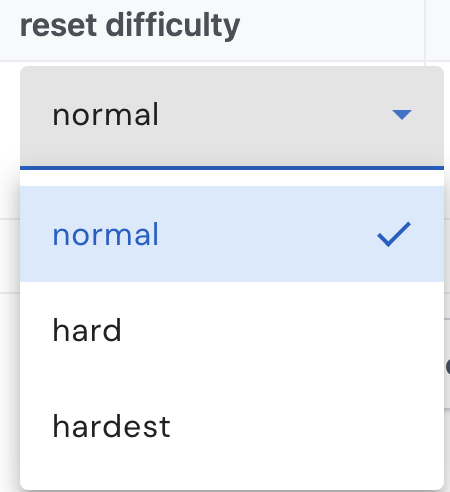
There are three scenarios to consider:
- If all factors are equally easy or hard to change, the reset difficulty option for all factors can be set to normal.
- If the factors can be divided into two groups say A and B, such that the settings of all factors in a given group are equally hard to change, and the settings for all factors belonging to group A are harder to change than for all factors belonging to group B, then assign "hard" as the reset difficulty for all factors in group A and assign "normal" as the reset difficulty for all factors in group B.
- If the factors can be divided into three groups say A, B and C, such that the settings of all factors in a given group are equally hard to change, and the settings for all factors belonging to group A are harder to change than for all factors belonging to group B, and all factors belonging to group B are harder to change than for all factors belonging to group C, then assign "hardest" as the reset difficulty for all factors in group A, "hard" as the reset difficulty for all factors in group B and assign "normal" as the reset difficulty for all factors in group C.
Miscellaneous notes
At this stage, the user cannot make anymore changes. In a later screen, the user will be allowed to
- Change names of each factor
- Set the minimum and maximum value for each quantitative factor based on the engineering units
- Provide labels for each categorical level for each categorical factor
After specifying the type of each factor and their reset difficulty, the user can click on Next at the bottom of the page which will take you to the Summary tab.
After verifying all details in the Summary tab, you can then click on Optimal design to go to next page.
Alternatively, if the user prefers to explore the existing catalog of designs already available in the EFFEX software, click on Search for design in catalog. This will lead to the Catalog search page, where the user will be presented with a selection of designs that match the requirements that have been already entered in the Experimental factors tab. It is possible that there are no designs in the catalog that match the requirements specified by the user, in which case, click on Optimal design.
Page last modified on 26 February 2025